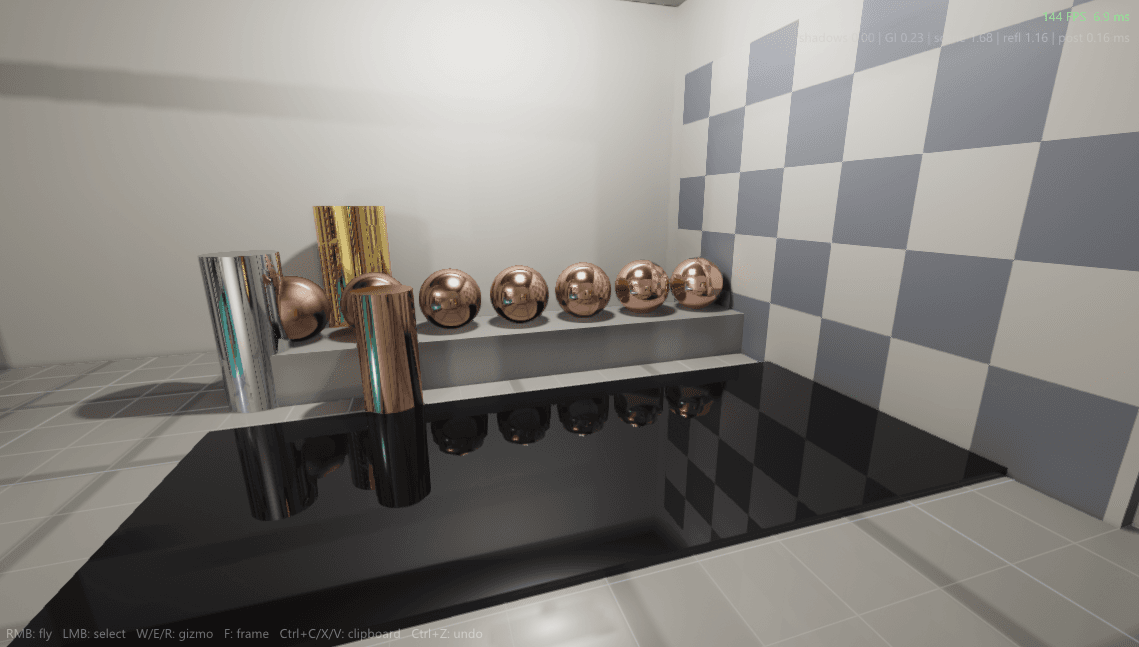
Documentation/Rendering
Materials and reflections
Why does gold look like gold and not painted yellow? Why does a wet road turn into a mirror at sunset but stay matte at noon? Both answers live in one shading model, and the best way to feel it is to grab the light and move it yourself. So this article opens with a real physically based sphere you can play with, then explains every dial on it.
- 12 min
- 3 figures
- Updated June 2026
Cook-Torrance
BRDF
GGX
distribution
4%
dielectric F0
70 to 95%
metal F0
The sphere below is not a video and not a pre-baked image. Every pixel of it is being shaded right now in your browser with the same equations REACT runs on the GPU: a microfacet specular term, a Fresnel term, a diffuse term, and a reflection of its surroundings. Your scroll is the material: as you move through the bench below, the sphere morphs continuously from chalk through plastic, water and gold to chrome — and back when you scroll up. Drag on the sphere to move the light while it happens.
Live · Experiment 01
Your scroll is the material
Tip
Watch the jump from Water to Gold. Both are smooth, but water keeps its blue body and reflects only a sliver of light, while gold throws back most of it and stains the reflection gold. That single step is the entire difference between a dielectric and a metal.
When light hits a surface, some of it reflects straight off the top (the specular highlight) and some sinks in, bounces around among the pigment, and leaves in a random direction having picked up the material's color (the diffuse). A shading model is just a function that, given the light direction, the view direction and the surface normal, returns how bright that surface should be. The standard one, and the one in the sphere above, is Cook-Torrance:
Eq 01
each symbol, explained —
The light leaving toward the eye is a diffuse part (the material color spread evenly) plus a specular part of three terms multiplied. The denominator keeps it energy-correct.
Those three specular letters are the whole game. F decides how much reflects at all, and is the subject of the next section. D is controlled by the roughness slider. G stops the model from cheating energy at grazing angles. Get all three right and one equation covers chrome, plastic, skin, rust and water.
Here is the most counterintuitive fact in rendering, and you can confirm it on the sphere right now: every surface becomes a perfect mirror when you view it at a shallow enough angle. Look at your matte desk straight on and it is dull; look along it toward a window and it gleams. That angular ramp is the Fresnel effect, and REACT uses Schlick's cheap, accurate approximation of it:
Eq 02
each symbol, explained —
Reflectance equals its head-on value, plus the remaining distance to 100% scaled by one minus the cosine of the view angle raised to the fifth power. At a grazing angle the cosine goes to zero and reflectance shoots to 1, a full mirror.
F0, the reflectance when you look straight at the surface, is the single most important number a material carries. It is tiny for everyday non-metals and large for metals:
| Material | F0 (head-on reflectance) | Class |
|---|---|---|
| Water | 2% | dielectric |
| Plastic, glass | 4 to 5% | dielectric |
| Skin, most organics | 2 to 4% | dielectric |
| Iron | 56% | metal |
| Gold | 100 / 71 / 29% (R/G/B) | metal |
| Silver, aluminium | 92 to 98% | metal |
Note
Gold's F0 is different per color channel, which is the entire reason it looks golden. Metals tint their reflection; that colored F0 is what the base-color swatch feeds when metalness is 1.
A mirror and a sheet of brushed steel are made of the same atoms. The difference is geometry too small to see: a mirror is flat at the microscopic scale, brushed steel is a field of tiny facets pointing every which way. Roughness is the width of that distribution of facet angles, and the GGX function is how REACT models it:
Eq 03
each symbol, explained —
The fraction of microfacets aligned with the half-vector. When roughness is near zero this spikes to a needle-sharp highlight; as roughness grows the spike spreads into a broad sheen.
On the sphere, roughness does two things at once that are really the same thing. The direct highlight from the light grows from a pinpoint into a soft glare, and the reflection of the room goes from a crisp mirror image to a foggy suggestion. Both are the facets disagreeing about which way to send light. A polished floor and a frosted one differ by exactly this one number.
shaders/brdf.glsl (the specular core)
float D_GGX(float NoH, float a) {
    float a2 = a * a;
    float d  = (NoH * NoH) * (a2 - 1.0) + 1.0;
    return a2 / (PI * d * d);
}

vec3 F_Schlick(float VoH, vec3 f0) {
    return f0 + (1.0 - f0) * pow(1.0 - VoH, 5.0);
}

// roughness drives alpha; metalness drives f0 and kills diffuse
float a   = roughness * roughness;
vec3  f0  = mix(vec3(0.04), baseColor, metalness);
vec3  spec = D_GGX(NoH, a) * G_Smith(NoL, NoV, a) * F_Schlick(VoH, f0)
/ (4.0 * NoL * NoV + 1e-4);There are really only two kinds of material in the physical world, and the metalness slider picks between them. Non-metals (dielectrics: wood, stone, plastic, water, skin) reflect a flat 4% and keep their color in the diffuse term. Metals reflect a lot, 70 to 98%, tint that reflection with their color, and have no diffuse at all, because the light that would have scattered as diffuse is instead absorbed. The workflow collapses both into one slider:
| Quantity | Metalness = 0 (dielectric) | Metalness = 1 (metal) |
|---|---|---|
| Specular F0 | fixed 4% | the base color, often colored |
| Diffuse color | the base color | black, none |
| Looks like | plastic, stone, paint | chrome, gold, iron |
Slide metalness from 0 to 1 on a colored sphere and watch the color jump from the body of the ball (diffuse) into the reflection (specular). That migration is the whole physical story of the metalness workflow, and seeing it happen in real time is worth more than any paragraph, which is why the toy comes first.
Warning
Half-metal values (metalness around 0.5) do not describe any real material; they are a blending artifact. A surface is either a metal or it is not. The slider spans the gap only so you can watch the transition.
The shading model exposes its workflow and debug views through the console:
| Variable | Default | Description |
|---|---|---|
| r_brdf | ggx | Specular distribution. ggx is default; beckmann and blinn are kept for comparison shots. |
| r_ibl | 1 | Image-based environment reflections. Turning it off leaves only direct lights, which is the toy with the environment switch off. |
| r_ibl_samples | 32 | Prefilter samples for rough reflections. Lower is faster and grainier on rough metals. |
| r_show_channel | off | Isolate a BRDF term: f0, roughness, metalness, fresnel, or specular. The debug views behind every figure here. |
| r_clearcoat | 0 | Optional second specular lobe for car paint and lacquer. Off by default. |
Further reading
- [01]Cook, R. L., Torrance, K. E. (1982). A Reflectance Model for Computer Graphics. ACM Transactions on Graphics, vol. 1.
- [02]Walter, B., Marschner, S., Li, H., Torrance, K. (2007). Microfacet Models for Refraction through Rough Surfaces. Eurographics Symposium on Rendering.
- [03]Schlick, C. (1994). An Inexpensive BRDF Model for Physically-based Rendering. Computer Graphics Forum, vol. 13.
- [04]Karis, B. (2013). Real Shading in Unreal Engine 4. SIGGRAPH Physically Based Shading course.
- [05]Burley, B. (2012). Physically Based Shading at Disney. SIGGRAPH Practical Physically Based Shading course.